Which mode is used depends on how the PROXESS Professional setup set is installed. Either the certificate mode or the OEM mode can be activated here. It is not possible to switch from certificate mode to OEM mode or vice versa at a later time.
|
|
Which mode is used depends on how the PROXESS Professional setup set is installed. Either the certificate mode or the OEM mode can be activated here. It is not possible to switch from certificate mode to OEM mode or vice versa at a later time. |
If you have installed PROXESS in the security certificate mode, a few preparatory steps must be performed in the PROXESS Administrator Console before starting the system and working with PROXESS for the first time.
AFTER the software installation and BEFORE the first login, you must:
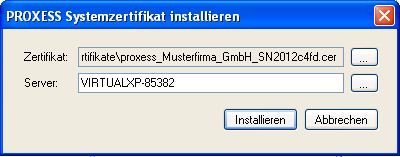
request, activate and install a PROXESS system certificate for your system
Prepare and create your first supervisor smartcard
Import your individual PROXESS system license (created by PROXESS GmbH)
Initialize the database signing
You can see how the individual steps are performed when you follow the links in the table.
|
First step: Install PROXESS software |
One time |
|
|
|
One time |
==> Online transfer of the request to PROXESS GmbH ==> PROXESS sends the signed file back to the applicant |
|
|
One time |
|
|
|
One time |
==> Transfer of the data from the supervisor certificate to PROXESS ==> Creation and transfer of the licensing files by PROXESS |
|
|
One time |
==> First PROXESS system start by the supervisor |
|
|
One time |
==> Now the system is unlocked!
==> Now user registration and other administration are possible |
|
|
Always in running operation |
We recommend that you create at least one additional supervisor smartcard for security reasons. |
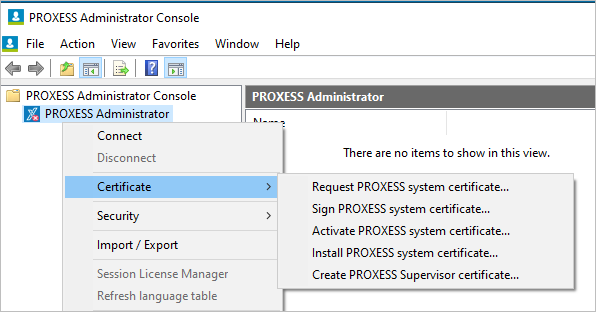
Fig.: Necessary steps for the PROXESS system certificate
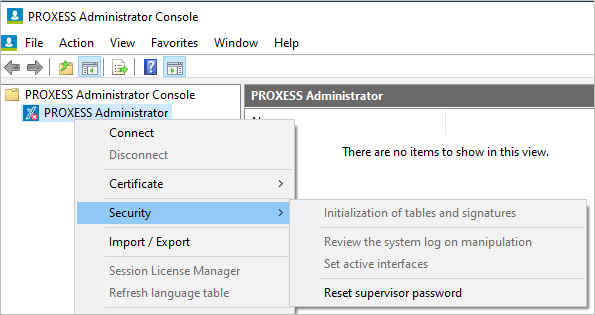
Fig.: Functions for the necessary database signing and for the optional encryption for high-security databases